
A year ago, if you'd said "my 7-year-old is vibe coding on Saturday morning," nobody would have known what you meant. Today, vibe coding is Collins Dictionary's Word of the Year for 2025, and it's reshaping how people (including children) build software.
A quick note on scope. Adults use vibe coding to build all sorts of things: websites, apps, internal work tools. This guide is specifically about vibe coding for games, because that's where the magic happens for children. A 7-year-old doesn't want to build a CRM. They want to make a silly dress-up game, a quiz about their dog, or a race through outer space. Game-making is where vibe coding meets the way kids actually play and think.
This is a complete parent's guide. It's long because the topic is new, and because the things you most want to know as a parent ("is this safe," "is it really coding," "at what age," "what will my kid actually build") don't have one-line answers yet. If you're short on time, the TL;DR is: vibe coding is using natural language (talking or typing) to tell an AI what to build, rather than writing code yourself. For adults it's tools like Lovable, Cursor, and Claude. For kids ages 5 to 12, it's what Buildaloo is building: voice-first, safe, and designed for how children actually think.
What is vibe coding? (A parent-friendly explanation)
In February 2025, the AI researcher Andrej Karpathy (one of the co-founders of OpenAI) posted a short note on X describing how he'd been building software lately. He wasn't writing code in the traditional sense. He was describing what he wanted, watching the AI produce it, running it, and iterating by describing what to change. He called this vibe coding.
The phrase caught on because it captured something new that didn't have a name yet: the shift from writing code to directing code. Later that year, Collins Dictionary named it Word of the Year 2025, alongside honorable mentions like brain rot and taskmaster. The Collins entry defines vibe coding as "the use of artificial intelligence, prompted by natural language, to assist in writing computer code."
In plainer English, here's what it means for a child making a game:
- Your child wants to make a game.
- Instead of learning syntax, typing code, or stacking puzzle blocks, your child describes the game out loud or in writing.
- An AI takes that description and builds the game (the actual code that runs on a computer).
- Your child plays the game, notices what's wrong, and describes the next change: "make the unicorn faster" or "the quiz needs one more question."
- The AI updates the game. Your child plays the new version.
That loop (describe, see, iterate) is the core of vibe coding. It's the same loop adult engineers use in tools like Cursor and Lovable. The difference for kids is that the AI has to be designed for them: patient, on-topic, safe, and able to handle the way a 7-year-old actually talks (mid-sentence changes, unclear references, wild imagination).
A quick glossary of the terms you'll hear:
- Generative AI. The kind of AI that produces something new (text, images, games, code) based on a description. ChatGPT, Claude, Gemini, and DALL·E are all examples.
- Natural language. How humans actually talk. "Make a dress-up game about a dragon" is natural language.
let x = 5; if (x > 3) …is not. - LLM (Large Language Model). The engine inside most generative AIs. It's trained on a huge amount of text and learns to produce responses that sound right.
- No-code. Any tool that lets you build software without typing code. Vibe coding is the most radical form of no-code: you don't even drag-and-drop.
- Prompt. What you say or type to the AI. "Build a matching game with 10 animals" is a prompt.
Why vibe coding for kids is different from vibe coding for adults
When adults vibe-code, they use tools like Lovable (for building web apps), Cursor (a code editor with an AI assistant), and Claude or ChatGPT for general coding help. These tools assume the user:
- Has a ChatGPT-style account, often paid.
- Can type fluently and read walls of text responses.
- Understands concepts like "server," "database," and "API" when the AI uses them.
- Wants to ship something real, like a startup idea, a side project, or a work tool.
None of this describes a 7-year-old.
The adult vibe-coding tools are like giving your child the keys to a sports car. Technically they can operate it, but almost nothing about the experience was designed for them, and the places they'd accidentally drive are places you don't want them to go.
The kids-first version is still mostly a blank canvas. Looking at the 2026 landscape:
- CodaKid has written content about vibe coding but points older kids toward adult tools.
- imagi partnered with Lovable on an "Hour of AI" for teachers, but it was gated and classroom-focused.
- Scratch and Tynker, the two historical incumbents, are still block-coding products without native vibe-coding experiences. We compare them directly in the 7 best Scratch alternatives for kids and Tynker vs Buildaloo.
- General chatbots (ChatGPT, Gemini, Claude) exist but weren't built for children and don't meet child-data compliance standards by default.
This is white space. The kind of white space that usually only exists for 12 to 18 months before a category closes. Buildaloo is specifically built for it: the first voice-powered AI game maker for kids, because most 7-year-olds talk long before they can type; safe, because children's products have to be safe by default, not by configuration; and age-appropriate in a way that adult tools fundamentally aren't.
Is AI safe for my child?
The parent anxiety around AI is completely reasonable. You're handing your child a tool you didn't grow up with, whose abilities are still expanding, with a media narrative that swings between "AI will save education" and "AI is dangerous for kids." Neither framing is useful for deciding whether to let your 7-year-old near it on a Saturday morning.
Here's what we'd actually recommend a parent check.
1. Is the tool designed for children?
General-purpose AI tools (ChatGPT, Claude, Gemini) are designed for adults. They can produce content that's inappropriate for kids, and their default safety filters aren't tuned for a 7-year-old's worldview. The American Academy of Pediatrics's 2024 guidance is blunt on this: children under 13 should not be using general-purpose AI chatbots unsupervised. A kid-specific AI (like Buildaloo's Loo) is tuned differently. Conversations stay on-topic, harmful content is filtered before it reaches the child, and the whole product is designed around what 5- to 12-year-olds actually want to do.
2. Is the data handled to child-safety standards?
In the US, the Children's Online Privacy Protection Act (COPPA) is the legal floor. In the UK, the Age-Appropriate Design Code adds more requirements on top. In the EU, GDPR has specific child-data provisions (sometimes called GDPR-K). A proper kids-first tool will meet or exceed these standards as defaults, not as optional configurations. If a tool asks for your child's real name, real birthday, or sign-up email and doesn't have clear parental-consent flows, walk away.
3. Can you see what your child is doing?
Not surveillance, but visibility. A good kids-first AI tool has a parent dashboard that shows every conversation the child had with the AI, what they built, and how long they spent. Common Sense Media recommends this as a baseline. Buildaloo has it; the adult AI chatbots do not.
4. Are there content guardrails?
The AI should refuse to engage with content that isn't age-appropriate: scary stuff, violent stuff, sexual stuff, adult politics. A well-tuned kids' AI redirects the conversation rather than lecturing, so your child doesn't feel told-off.
5. Is there any chat with strangers?
The answer should be "no," full stop. Unlike Roblox or a public Discord, a well-designed kids' AI tool has your child talking to one thing only: the AI. No usernames, no multiplayer lobbies, no comment sections with unknown users.
Buildaloo is built to every one of these. Loo is the only AI your child talks to, the conversation stays in the creative-making lane, data meets COPPA and GDPR-K standards, and every session is visible to you.
At what age can a child start vibe coding?
Short answer: 5.
Longer answer: vibe coding scales naturally with developmental stage, and the tool has to meet the child where they are.
Ages 5–7 (UK Key Stage 1 / Year 1–2, US Kindergarten to 2nd grade, AU Foundation to Year 2)
This is the voice-only age band. Most children can talk fluently and describe what they want long before they can read a sentence, spell reliably, or type without help. What they need is:
- A microphone-first interface.
- An AI that asks follow-up questions in plain language ("What color is the dragon?" not "Please specify RGB values").
- Extremely short feedback loops, with a game ready to play within a minute or two, not thirty.
At this age, the vibe-coding loop is: say an idea, play the game, change one thing, play again. Forty-minute sessions are normal. What kids build is usually silly and short: a unicorn that eats stars, a quiz about the family dog, a matching game about their grandparents' faces. That's the point. The skill they build is articulation and iteration, which is the core of creative work, not just of coding. If your child is 7 specifically, our complete guide to the best coding app for 7-year-olds covers what first sessions look like and which games work best, and our pillar on AI literacy at age 7 explains why 7 is the developmental inflection year for directing AI.
Ages 8–10 (UK Key Stage 2 / Year 3–6, US 3rd to 5th grade, AU Year 3–6)
Reading and typing are faster. The child can hold a longer project in their head, like "I want a whole game with five levels." They start to want more control and to understand a little bit of what's happening under the hood. A good vibe-coding tool for this age shows a bit more of the game's guts: images they can choose, sound effects they can pick, themes they can swap.
This is also the age where your child might start asking questions like "but what's actually making this game work?" That's a great teaching moment, and a good tool should have honest answers. A real vibe-coding platform is generating real code; your child doesn't need to see it, but they should know it exists.
Ages 11–12 (UK KS2–KS3 transition, US 6th–7th grade, AU Year 6–7)
Pre-teens are capable of more ambitious projects and often want to share what they made. They may start asking about "real" programming (Python, JavaScript) because they've seen older siblings or YouTube tutorials use them. Vibe coding at this age is a perfect on-ramp: they've already experienced the joy of shipping a thing, and they can choose to go deeper from there.
Australian parents may be used to seeing this in the Digital Technologies curriculum, which emphasizes computational thinking from Foundation onward. Vibe coding is the lowest-barrier way to practice computational thinking (breaking a fuzzy idea into clear steps) without needing the syntax to follow.
The best AI game maker for kids in 2026
When we wrote this guide, we went looking for what other kid-focused tools exist in this exact space: AI-native, creation-first, safe for ages 5 to 12. The honest answer is: almost nothing, yet.
- Buildaloo (that's us) is voice-first, built for ages 5–12, COPPA-compliant, and optimized for iPad-primary use. Your child describes the game out loud, Loo builds it, they iterate by talking. Parent dashboard, no open chat, no typing required.
- Rosebud AI is an AI game-making platform, but it's adult-focused. The UI, terminology, and safety defaults assume an adult user.
- GDevelop and Codorex have experimented with AI features, but like Rosebud they're adult-leaning.
- CodaKid, Create & Learn, and JetLearn are tutoring businesses. They teach kids to code in Python, JavaScript, or other adult languages, with AI as a tool on the side. They're valuable but are a different category.
- ChatGPT and Claude are general chatbots, not built for children.
This is part of why we think of Buildaloo as more than an app. It's the first dedicated product for vibe coding for kids. You can call it an AI game maker for kids, a voice-first coding app, or a no-code game maker for kids, and all of those are accurate. What matters is that it's a place where a 7-year-old can sit down, describe what they want, and walk away having made something real.
If you're a UK parent searching for apps for children in this space, or an Australian parent looking at Digital Technologies options for younger kids, this is the category, and it's just beginning.
What can your child actually build?
This is the question that turns skeptical parents into advocates. Buildaloo is organized around the kinds of games kids actually want to make. Here are the nine game types your child can describe to Loo on day one:
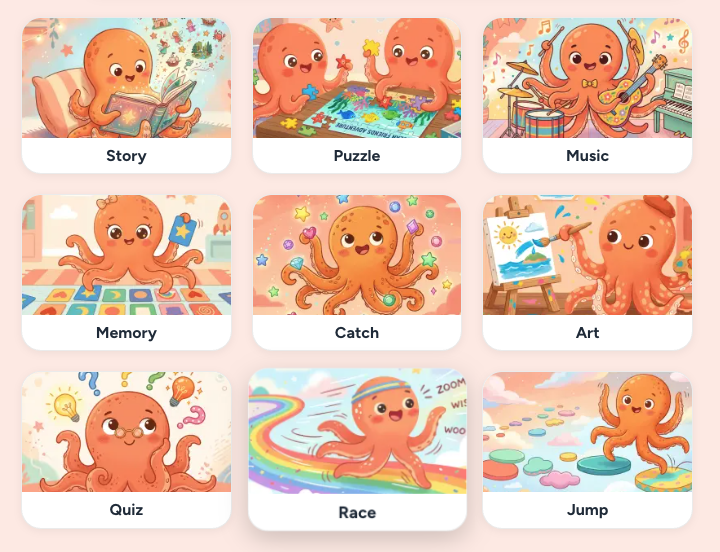
1. Story. Interactive choose-your-own-adventure games. A child describes the world, the hero, and a few forks in the road, and Loo stitches together a playable story. Brilliant for kids who love books but aren't ready to write them yet.
2. Puzzle. Sliding tiles, shape-matching, word puzzles, or small logic games. The child picks a theme (dinosaurs, planets, their favorite cartoon) and Loo wraps it around a puzzle mechanic.
3. Music. Drum pads, melody makers, small beat-building mini-games. Kids who drift toward music rather than movement make things here that surprise everyone, including themselves.
4. Memory. Classic flip-card matching, but the cards are whatever your child wants: the family dog in different poses, planets, Pokémon, cousins' faces. Easy to ship in one session and endlessly replayable.
5. Catch. A falling-objects game. Catch the raindrops, dodge the asteroids, collect the pumpkins. Simple mechanic, infinite themes. Usually the first game a 5-year-old ships on their own.
6. Art. Drawing canvases, stamp-based illustration tools, coloring-in games with the child's own characters. More creative tool than game, but kids consider it a game, which is what matters.
7. Quiz. Trivia about anything: the savanna, the family, the periodic table, their favorite show. Kids turn their own knowledge into a game their friends and family play on Friday night.
8. Race. Two-tap racing games. Cars, horses, spaceships, penguins. The kid designs the track and the racer, and Loo handles the physics.
9. Jump. Simple platformer-style games: tap to jump, avoid obstacles, collect coins. The "platformer" category but stripped down to what a 7-year-old actually finds fun.
Across all nine types, the pattern is the same. Your child picks a type, describes the theme, plays the first version, notices what's wrong, and describes the next change. That loop (articulate, ship, iterate) is the real skill. Coding used to gate it. Vibe coding opens it.
Vibe coding vs. traditional coding: which does your child need?
You don't have to choose. But here's an honest comparison to help you decide where to spend your child's time.
| Traditional coding (Python, JavaScript, Scratch) | Vibe coding | |
|---|---|---|
| How it works | The child writes the code themselves, line by line or block by block | The child describes what they want; the AI writes the code |
| Core skill | Syntax, precision, debugging from error messages | Articulation, iteration, and directing AI |
| Youngest viable age | Around 7–8 for ScratchJr, 10+ for Python | 5, with a voice-first tool |
| Time to first playable game | Weeks to months | Minutes |
| What it teaches | Algorithmic thinking, computer-science fundamentals | How to take an idea from your head to a working thing |
| Path to professional dev | Direct | Indirect, but not a dead end |
| Fun for a typical 7-year-old on a Saturday | Usually frustrating without a parent helping | Usually joyful and self-directed |
Traditional coding is still valuable. If your child wants to become an engineer, they'll still learn Python or JavaScript eventually. But for a 7-year-old in 2026, the ordering has flipped: start with vibe coding (because they can), move to traditional coding later (if they want to). The kids who start with vibe coding at 7 arrive at Python at 11 already knowing how to take an idea from their head to a working thing. That's a bigger head start than any curriculum can give them.
As the writer Paul Graham has put it, "the best programmers think like writers." Vibe coding teaches the thinking-like-a-writer part first. The syntax can come later.
How to start vibe coding with your kid this weekend
You don't need to do anything fancy to start. Here's the pattern we recommend:
Step 1: Set up the iPad once. Create the parent account, set up your child's profile, configure the daily limit (we'd suggest 30 minutes for a first session). Five minutes, once.
Step 2: Ask your child what they'd make. Open-ended. "If you could make any game in the world, what would it be?" The answer is the seed. Don't edit it.
Step 3: Sit with them for the first session. Not to help, but to watch. Most parents are surprised by how quickly their kid falls into the rhythm of describing, playing, and iterating. You'll probably also notice them use words they don't normally reach for.
Step 4: Don't fix their grammar. The point is articulation practice, not a language class. Loo will ask clarifying questions when needed; that's where the learning happens.
Step 5: Celebrate shipping, not perfection. When they play their finished thing, whether or not it's polished, the response is "you made something." That's the mindset you're trying to build. Treat shipping as normal.
Do this once a weekend for a month and you'll notice something. Your child will start treating their own ideas with more respect. They'll start saying things like "I'll make the small version first" without being prompted. That's the real win of vibe coding for kids. Not that they'll be engineers at 30. That they'll treat their own imagination as something worth shipping.
FAQ
Is vibe coding really coding?
In the strict sense, no. Your child isn't writing the code themselves. The AI is. But the creative and problem-solving parts of coding (breaking a fuzzy idea into clear steps, iterating based on what works, shipping something) are all present in vibe coding. The mechanical typing-of-syntax is what's abstracted away. That's the same transition that happened when assembly language gave way to higher-level languages.
Can AI replace coding classes?
No, and we wouldn't want it to. What it can replace is the barrier: the years of syntax learning before a child gets to build something fun. For kids who later want to learn Python or JavaScript, vibe coding is the best possible on-ramp, because they arrive already knowing what "shipping a thing" feels like.
Does my kid need to learn Python to make a game?
In 2026, no. Buildaloo and tools like it let a 7-year-old make a real, playable game by describing it. If your child later wants to learn Python for other reasons (school, curiosity, more complex projects), that's still valuable. But the bar to making a first game has dropped to zero reading, zero typing, zero Python.
What's the difference between vibe coding and no-code?
No-code typically means drag-and-drop interfaces, like Scratch's block coding or adult tools like Webflow. You still have to operate a complex UI. Vibe coding is further along: you describe what you want in plain language, and the AI builds it. No UI to master, just conversation. For children specifically, voice-first vibe coding is the lowest-barrier form that exists today.
Can a child who doesn't speak English fluently vibe code?
Yes. Buildaloo supports multiple languages, and kids who are bilingual (or still learning English) often benefit the most. They can describe ideas in their strongest language and the AI responds in kind. Global early-reader kids are one of the groups vibe coding most obviously helps.
Is "vibe coding" going to last, or is it a fad?
The term might evolve, but the underlying shift (from writing code to directing code) is the biggest change in software development since the introduction of web browsers. It's not going away. What might change is the vocabulary around it, or the specific tools. The shape of what kids do on a Saturday morning in 2028 will still look a lot like what the earliest Buildaloo kids are doing today.
Ready to try vibe coding with your kid?
Buildaloo is a voice-first AI game maker for kids 5 to 12. Your child describes the game. Loo (our AI buddy) builds it. COPPA-compliant, no open chat, no typing required. Built for how 7-year-olds actually talk, imagine, and play.
Try the Buildaloo Voice-First Demo →
Free while in beta. Takes one minute to join the waitlist.